
Why to Rebuild Index in Database?
Rebuilding index is the common task we do in database maintenance activities. But lot of people still have a question in mind, what is rebuild and why we rebuild index in Database. Let me explain today the reason for rebuild.
Database automatically maintains indexes whenever insert, update, or delete operations are made to the underlying data. Over time these modifications can cause the information in the index to become scattered in the database (fragmented). Fragmentation exists when indexes have pages in which the logical ordering, based on the key value, does not match the physical ordering inside the data file. Heavily fragmented indexes can degrade query performance and cause your application to respond slowly.

You can remedy index fragmentation by reorganizing or rebuilding an index. For partitioned indexes built on a partition scheme, you can use either of these methods on a complete index or a single partition of an index. Rebuilding an index drops and re-creates the index. This removes fragmentation, reclaims disk space by compacting the pages based on the specified or existing fill factor setting, and reorders the index rows in contiguous pages.
When ALL is specified, all indexes on the table are dropped and rebuilt in a single transaction. Reorganizing an index uses minimal system resources. It defragments the leaf level of clustered and nonclustered indexes on tables and views by physically reordering the leaf-level pages to match the logical, left to right, order of the leaf nodes. Reorganizing also compacts the index pages. Compaction is based on the existing fill factor value.
Step 1 : Login to server thru OS Level using User orasid
Step 2: Enter command brtools to perform the rebuild index in oracle online
Step 3 : As shown in the screenshot below select enter option 3 - Segment Management from main menu of Brtools
type 3 in the Enter your choice

Step 4 : In the next screen as shown below choose option 2 Rebuild Indexes to Rebuild index in Oracle.



Thanks and Regards,
Maina.in
Step by Step process of How to rebuild Index in Oracle Online.
Index rebuilding can be easily done using the brtools in Oracle. here are the steps we follow to rebuild index in oracle online using brtools.Step 1 : Login to server thru OS Level using User orasid
Step 2: Enter command brtools to perform the rebuild index in oracle online
Step 3 : As shown in the screenshot below select enter option 3 - Segment Management from main menu of Brtools
type 3 in the Enter your choice

Step 4 : In the next screen as shown below choose option 2 Rebuild Indexes to Rebuild index in Oracle.

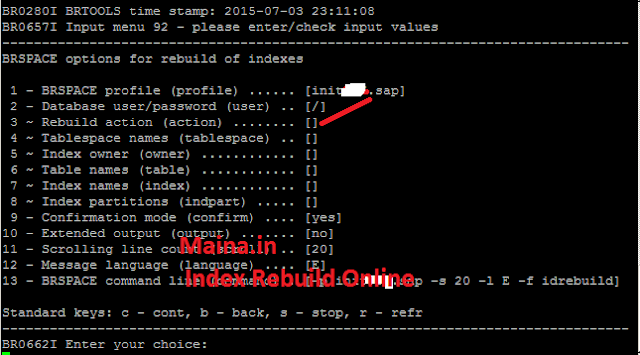
Step 5 : In the Next screen choose option 3 to enter the Index names (index) to fill in the index name. Then, choose option 3 ~ Rebuild action (action)

Step 6: similarly choose 4 and 7 in the next steps to update the table name and index name accordingly to rebuild index in oracle online
Step 7 : after updating the necessary information like Table name, Index name as shown below

Step 8 : Choose c (twice) to execute the Index rebuild process online, in the process if you recieved any warning related to Auto extension of table space, choose c and continue.
Step 9 : When the Online Index rebuild in Oracle started we can see the status as shown below

Thanks and Regards,
Maina.in
